Work through the section that matches what you are seeing. If none of them fit, email [email protected] and we will help.
Windows says “Windows protected your PC”
This blue screen can appear the first time you open the installer on Windows. It shows up because the app is new to Windows, not because anything is wrong. The installer is signed, and Windows warns about new software until enough people have installed it.
- Click More info.
- Click Run anyway, then finish the install as normal.
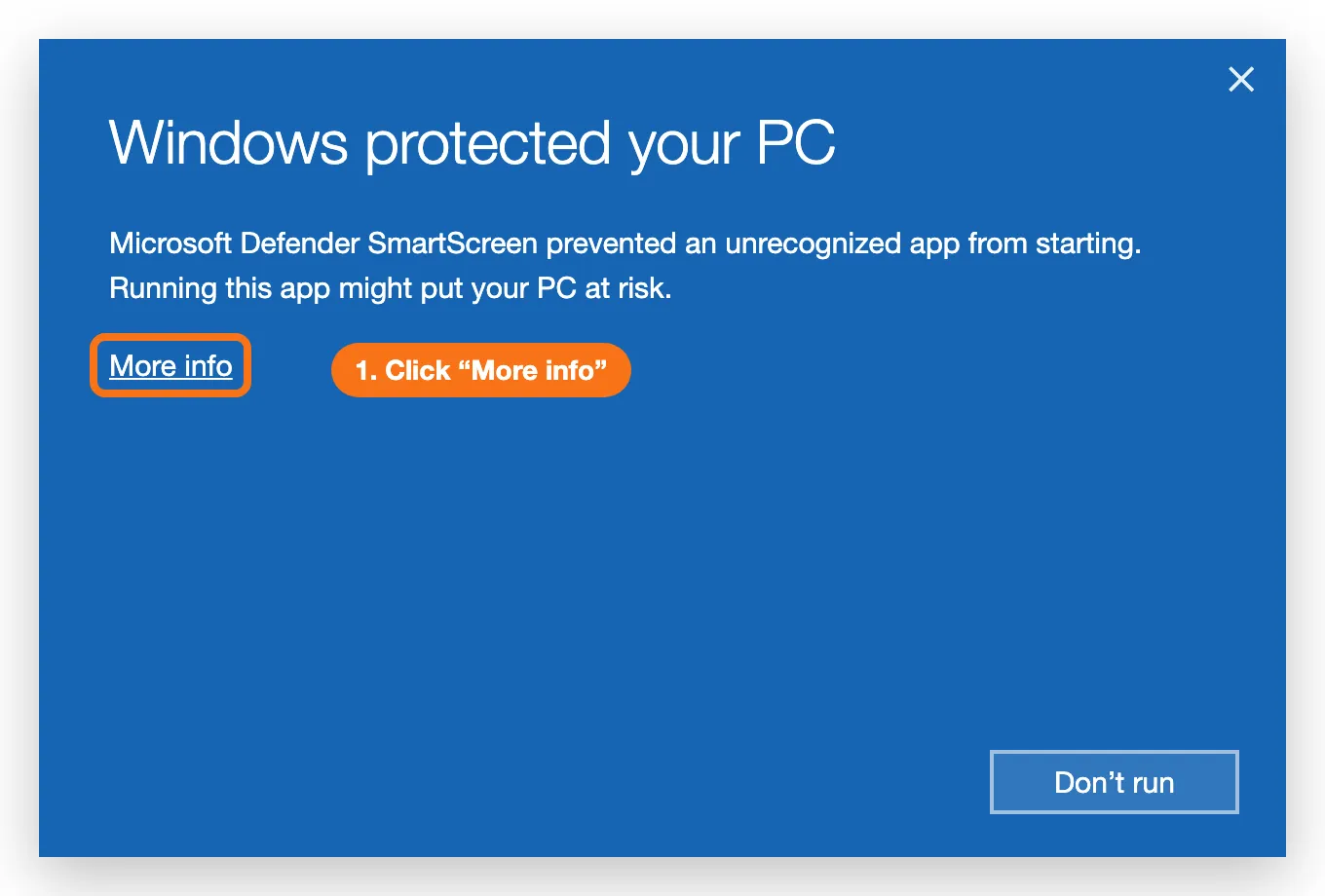
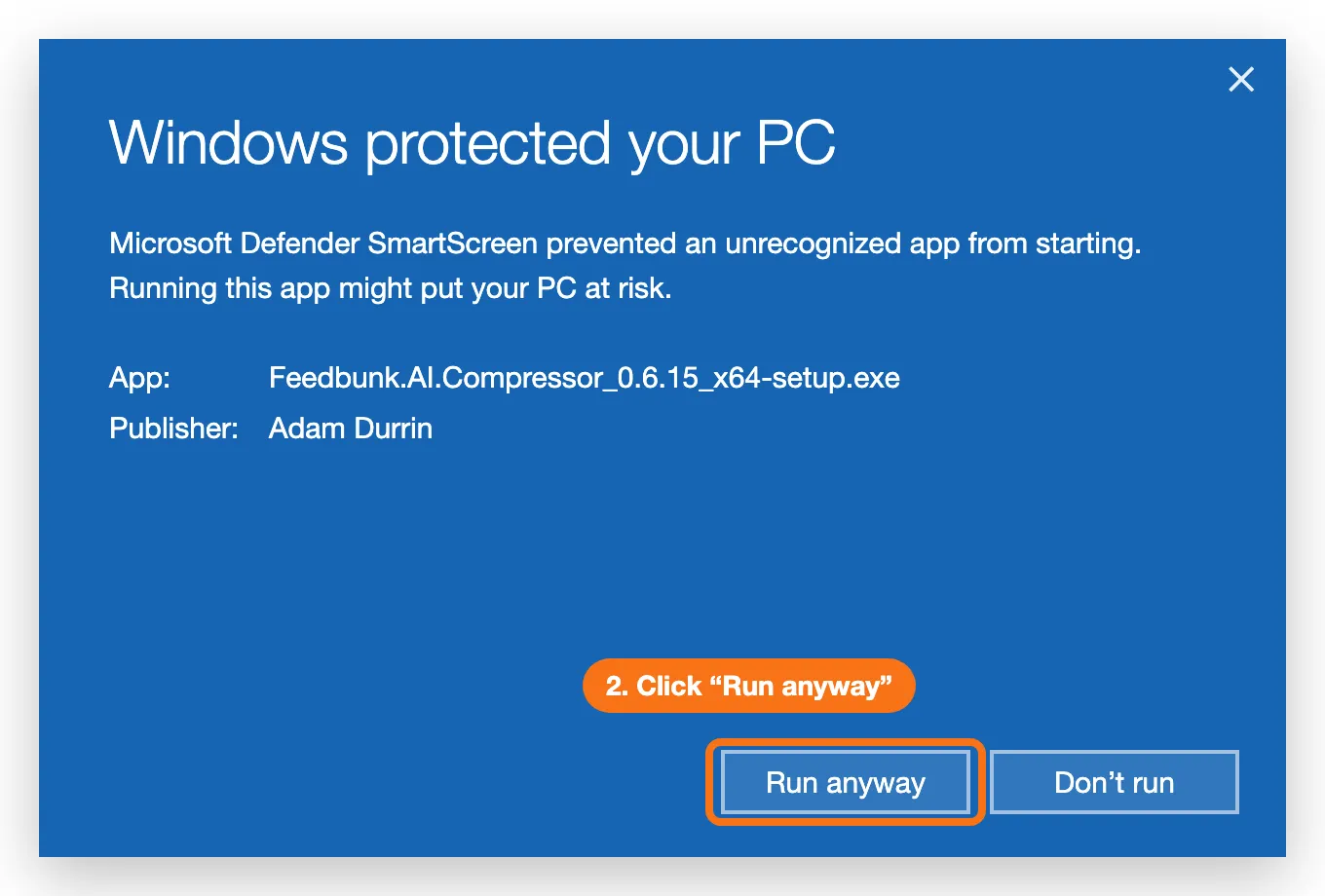
You only need to do this once.
If there is no Run anyway button at all, your computer may be managed by work IT, who will need to allow the app. Email support if you are stuck.
The app found far fewer photos than I expected
- You pointed at the wrong folder. Cameras usually store photos under
DCIMin a folder with a name like200TLCPR. Point at that, or at the folder above it — the app searches subfolders. - Some photos are only in the cloud. If the folder is inside OneDrive or iCloud, files that have not been downloaded to the computer are skipped, and the app tells you how many. Right-click the folder and choose Always keep on this device (OneDrive) or Download Now (iCloud), let them download, and scan again.
- The card filled up mid-run. Check the date on the last photo. If it stopped days before you collected it, the card ran out of room — see SD cards, power, and how long to record.
- The camera stopped. Flat batteries at a 10-second interval are the usual cause. External power is strongly recommended.
It says there is not enough disk space
The app needs working room while it runs, and for video jobs that is much more than the finished files take. The app will not start the job until there is enough room. Pick an output folder on your computer’s main drive, not on the SD card, and clear some space if you need to. Full explanation in Choosing an output folder and free disk space.
My photos are not a supported type
The app handles JPEG, PNG, and WebP images, and most common video formats.
It does not handle HEIC. If your files are HEIC, convert them to JPEG first, or check whether your camera can be set to save JPEG instead.
I cannot sign in
- Use the same email and password as the website. If you can sign in at app.feedbunkai.com but not in the app, the credentials are not the problem — email support.
- Have you verified your email? A brand new account cannot sign in anywhere until the verification link has been clicked.
- Two-factor turned on? The app asks for the 6-digit code from your authenticator app after the password.
- No account yet? Registration is on the website only. The Create an account link opens your browser.
The upload is stuck or very slow
- Check the throughput figure. If it is moving at all, it is working — very large batches simply take a while.
- Try Pause then Resume. That re-establishes the connection without losing progress.
- If your connection has dropped entirely, close the app. Nothing is lost. When you are back online, open the app, click Choose… next to Output folder, pick the same folder, and click Resume upload →.
A video is stuck on “Extracting frames”
For a video, the app first pulls the frames out. The Current line reads Extracting frames from … with a count, and the bar fills to about halfway before the frames are converted. A long video can take a while on an older computer. If the count is still climbing, it is working — leave it.
It says my photos are too far apart
Before you upload, the app checks how far apart your photos were taken. FeedBunk AI needs one every 5–15 seconds; wider gaps give poor results or none. Tick the box to upload anyway, then set your camera’s interval to 10 seconds for the next run. For video the app cannot read the interval, so it asks you to confirm your camera setting instead.
It will not let me finish because files failed
If more than 5% of the batch failed to upload, the app requires you to retry rather than finishing. A batch missing that much footage would fail our verification and the payment hold would be cancelled, so retrying is genuinely the faster route. Use Retry failed — it only re-sends what is missing.
The app is out of date
Each time you open it, the app checks for a new version and shows a New version … available bar. Click Install & relaunch. If you clicked Later, it asks again next time you open it.
If you are on a very old version from before the update check existed, download the installer once more from feedbunkai.com/get-started.
There is no installer for my computer
Mac and Windows only. On Linux, ChromeOS, or a phone, use the browser uploader instead — everything works, large uploads just take longer.
Still stuck?
Email [email protected] with your farm name, roughly how many photos you were uploading, and what the app said — a screenshot of the error helps a lot.