Your report is one long page. This article walks it top to bottom; each section links to the article that goes into detail.
Open it from the View Report button on a finished project, from the Latest Report tile on your dashboard, or from the link in the email we send when it is ready.
The header

At the top you get your project name and a status badge, a PDF button, a Refresh button, and a row of facts about the footage:
- The date range the photos cover
- How many images went into it — 12,345 images
- How many days of footage there are, and the timezone — 7 days recorded · CDT
- A coloured pill: Feed Available: 96.4%
That last one is the headline number. It is the share of recorded time that feed was actually in the bunk:
| Colour | Meaning |
|---|---|
| Green | 95% or above — under about 1.2 hours empty per day |
| Amber | 87% to 95% — roughly 1 to 3 hours empty per day |
| Red | Below 87% — more than about 3 hours empty per day |
These bands come from dairy extension research, which puts feed availability at 21 to 23 hours a day.
Report Metrics — three cards
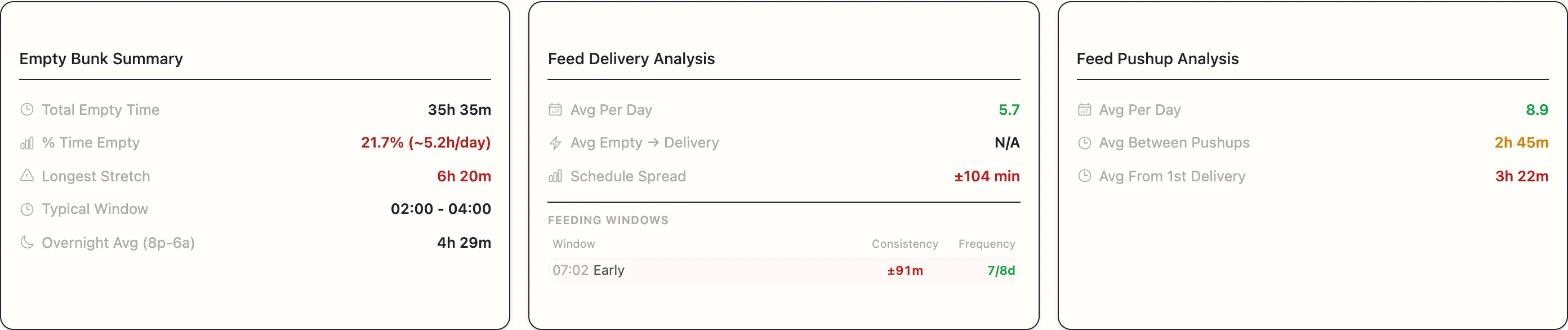
The numbers, grouped:
- Empty Bunk Summary — total empty time, percentage, longest stretch, when it typically happens, and overnight average.
- Feed Delivery Analysis — deliveries per day, how fast an empty bunk gets refilled, and how tightly your delivery times hold.
- Feed Pushup Analysis — push-ups per day, gaps between them, and how long after the first delivery the first push-up lands.
Nearly every value is colour-coded green, amber, or red against dairy-extension benchmarks. The colours are the fastest way to read the page — scan for red first.
Feeding & push-up schedule
A plain-language summary of your typical day, and — if you told us your intended feeding times — a grade against them. Things like 12/14 feedings on time and ~35m later than your 06:00.
See Your feeding and push-up schedule.
The event lists
Two lists side by side:
- Empty Bunk Events — every stretch the bunk was empty.
- Vehicle Activity Events — every delivery, push-up, and clean-out.
Click any row to see the actual photos it came from. This is where you check the system’s work, and where you correct it.
See Event lists and event photos.
Report Charts
Four pictures of the same week from different angles — the day-by-day timeline, push-ups after delivery, push-ups against empty time, and how far each event drifted from its usual time.
See The feed status timeline and The report charts.
What to do first
If you only have five minutes:
- Look at the Feed Available pill. Green, amber, or red?
- Look at Longest Stretch in the Empty Bunk Summary. Anything over three hours is worth chasing down.
- Look at the Feed Status Timeline and find the day that looks different from the others.
- Click into a couple of events and check the photos agree with the label.
If your report has no events
Occasionally a report comes back with nothing in it, and a red notice explains why. There are two versions:
“We could not read reliable capture dates from these images…” The camera’s date stamp was missing or unreadable, so the photos could not be placed on a timeline at all. Check the camera’s date and time settings — see Supported files and photo timestamps. This is the most common cause, and it is nearly always a camera clock that reset when the batteries were changed.
“No deliveries, push-ups, or empty-bunk periods could be identified in this upload.” The dates read fine but nothing was found. If you expected events in that footage, email [email protected] — do not just re-upload, because the same footage will produce the same result.
Numbers look out of date?
If you have been rejecting or re-tagging events, a small card appears at the bottom right — Statistics outdated / Refresh to update calculations. Click Refresh and everything recalculates from your corrections.